Thin Launcher and Slim Launcher both hard-limit your home screen, but to different numbers: 7 apps free / 11 on Pro for Thin Launcher versus a fixed 5 for Slim Launcher, per its public listing. Thin Launcher adds colour themes and one-time (not subscription) Pro and Ad-Free purchases; Slim Launcher stays text-only. Neither tracks your screen time — for that, see minimalist phone or MonoPhone below.
If you're reading this, you've probably already decided you want a minimalist Android launcher — the question is which one. There are more "distraction-free" launchers on the Play Store than most people expect, and they're not interchangeable. Some hard-limit your home screen apps. Some focus on blocking apps by the clock. Some are just a plain text list with zero settings. Picking the wrong one means reinstalling your old launcher in a week.
This post compares Thin Launcher to the other minimalist and focus launchers people search for most, so you can see where it actually differs instead of taking a marketing page's word for it. Where we're not 100% certain of a competitor's specific numbers, we say so and point you to their public listing.
What Thin Launcher actually does
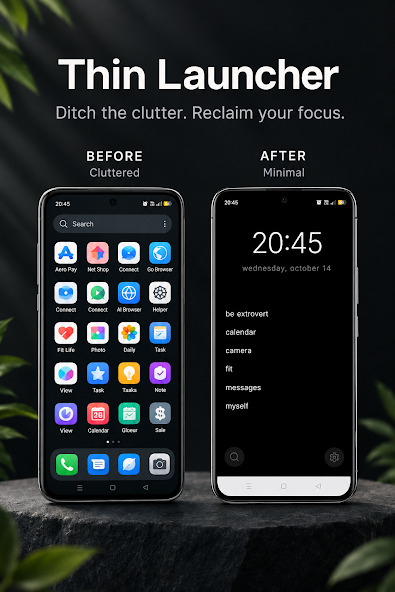
Thin Launcher's core mechanic is simple: it hard-limits how many apps can live on your home screen. On the free tier, you pick up to 7 apps during onboarding. Upgrade to Pro (a one-time purchase, not a subscription) and that limit rises to 11. Everything else you own is still on your phone — it just lives in the app drawer, one swipe or search away, instead of competing for your attention on the screen you see fifty times a day.
The visual side is plain black-and-white by default, with a growing set of colour themes (including some Catppuccin-inspired palettes) that you can unlock either by watching a rewarded ad or by buying Pro. There's no subscription anywhere in the app — just one-time purchases for Ad-Free, Pro, and optional tip jars if you want to support development.
Importantly, Thin Launcher does not track your screen time or block apps by schedule. It's a layout and friction tool, not a usage-tracking tool. If what you want is an app-timer or screen-time dashboard, that's a different category of app — more on that distinction below.
Thin Launcher vs Slim Launcher
Slim Launcher is probably the closest mechanical relative Thin Launcher has. It also enforces a hard cap on home screen apps, and based on its public Play Store listing, that cap is fixed at 5 apps with a text-only, no-wallpaper interface.
| Thin Launcher | Slim Launcher | |
|---|---|---|
| Home screen app limit | 7 (Free) / 11 (Pro) | 5 (fixed, per public listing) |
| Visual themes | Multiple colour themes, including Catppuccin-style | Text-only, no wallpaper (per public listing) |
| Pricing model | Free + one-time IAPs (Ad-Free, Pro, tips) | See current Play Store listing |
If you want the absolute strictest, most text-first experience and 5 apps is genuinely enough for you, Slim Launcher's fixed limit may suit you well. If you want a slightly higher ceiling (7, or 11 on Pro) and some visual personality via colour themes without giving up the hard-limit mechanic, Thin Launcher gives you that same core discipline with more room to tune it to your taste.
Thin Launcher vs minimalist phone
minimalist phone is one of the most downloaded apps in this category, and its focus — per its public positioning — is screen-time and app-blocking features with a grayscale aesthetic, often pitched toward ADHD-friendly use cases.
That's a meaningfully different approach from Thin Launcher. minimalist phone's strength is usage tracking and blocking by schedule; Thin Launcher doesn't do that at all — it never tracks your screen time or enforces time-based blocks. Instead, it changes the environment itself: if an app isn't one of your chosen 7 (or 11), it's simply not sitting on your home screen, so there's nothing to track or block in the first place. Which approach works better depends on whether you respond to "the app isn't blocked, but it's also not in my face" versus "I want a timer and a block on specific apps."
Thin Launcher vs Olauncher
Olauncher markets itself as minimal AF — open-source, zero ads, privacy-first, with a clean list-based home screen. It doesn't appear to enforce a hard numeric cap on home screen apps the way Thin Launcher and Slim Launcher do; based on its public listing, it's more about visual simplicity and giving you a small, deliberately chosen set of shortcuts without a strict ceiling mechanic.
If open-source and zero ads under any circumstance are non-negotiable for you, Olauncher is worth a look. If you specifically want the enforced-scarcity mechanic — a hard wall that stops you from quietly adding a ninth, tenth, eleventh app back onto your home screen — Thin Launcher's limit is the more deliberate constraint, and its free tier still only shows ads rather than requiring payment.
Thin Launcher vs Before Launcher, Indistract, MonoPhone, Zen Detox, and Minimo
A few other launchers come up often in "minimalist launcher" searches, each with its own angle, based on their public store listings:
- Before Launcher leans into notification filtering and a broader mindfulness framing rather than a hard app-count limit.
- Indistract Minimalist Launcher frames itself around "no nonsense" productivity, referencing ideas from books like Atomic Habits and Deep Work.
- MonoPhone combines a minimalist layout with a built-in Pomodoro focus timer and app blocker — closer to a productivity-timer app that happens to have a minimal launcher attached.
- Zen Detox focuses on mindfulness and work/life "app profiles" you switch between.
- Minimo is a text-first, open-source launcher in a similar spirit to Olauncher.
None of these is "wrong" — they're solving slightly different problems. If you want timers, blocking schedules, or app profiles, several of the above are built specifically for that. If what you actually want is simpler than all of that — just fewer icons on the screen you look at constantly, with the rest of your apps one search away — that's the one problem Thin Launcher is built to solve well, and it does it without subscriptions.
So which one should you pick?
A rough way to think about it:
- Want the strictest fixed limit and don't need colour themes? Try Slim Launcher.
- Want screen-time tracking and scheduled app blocking? Try minimalist phone.
- Want fully open-source and ad-free no matter what? Try Olauncher or Minimo.
- Want a built-in Pomodoro timer alongside a minimal layout? Try MonoPhone.
- Want a hard app-count limit (7 free, 11 Pro) with some visual personality, no subscription, and nothing tracking your usage? That's Thin Launcher.
The honest truth is that the "best" minimalist launcher is the one whose specific mechanic matches the specific bad habit you're trying to break. If your problem is "I keep tapping random apps because they're all sitting right there," a hard home-screen limit directly solves that — and that's exactly what Thin Launcher was built around.
This list focuses on launchers that are already minimalist-positioned. If you're coming from a deep-customization launcher instead — Nova, Niagara, Action Launcher, or similar — and trying to work out whether a minimalist launcher is even the right next step, see our Nova Launcher alternative post and our Niagara Launcher vs Thin Launcher comparison, which both walk through that "different jobs" question in more depth.
Frequently asked questions
Is Thin Launcher better than Slim Launcher?
Neither is strictly "better" — they're the same core mechanic (a hard home-screen app limit) at different settings. Slim Launcher's limit is a fixed 5 apps with a text-only look. Thin Launcher's limit is 7 (free) or 11 (Pro), with optional colour themes if you want more than plain black-and-white.
Is there a minimalist launcher alternative with no subscription?
Yes — Thin Launcher, Slim Launcher, and Olauncher are all free-to-start with no subscription anywhere. Thin Launcher's Ad-Free and Pro upgrades are one-time in-app purchases, not recurring charges.
Which minimalist launcher tracks screen time?
Thin Launcher and Slim Launcher don't track screen time or usage at all — they only change your home screen layout. minimalist phone and MonoPhone are built specifically around screen-time tracking and scheduled app blocking instead.
Try the app-limit approach for yourself —
free to start, one-time purchase to unlock Pro.
Get Thin Launcher on Google Play