"Minimalist launcher" covers a surprisingly wide range of apps. Some just strip the visual clutter off a normal launcher. Some hard-limit how many apps you can keep on your home screen. Some add screen-time tracking and app-blocking schedules on top. A few are built around a specific idea — a Pomodoro timer, a mindfulness framing, a book like Atomic Habits.
Below is a practical, non-sponsored-feeling roundup of the minimalist launchers people actually search for in 2026, organized by what each one is genuinely best at — based on each app's public Play Store listing — so you can skip the trial-and-error.
1. Thin Launcher — best for a hard app-count limit with no subscriptions
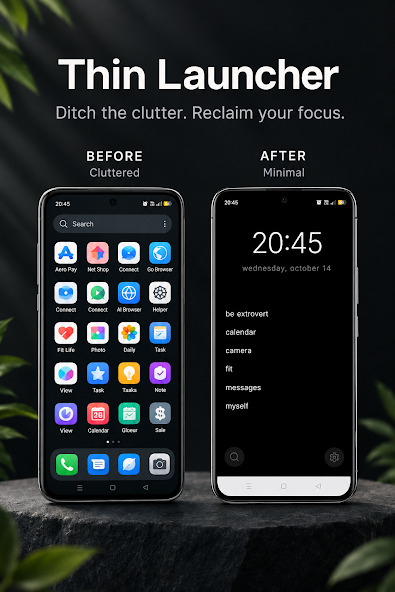 Hard app limitOne-time purchaseColour themes
Thin Launcher caps your home screen at 7 apps on the free tier, or 11 on Pro — a one-time purchase, not a subscription. Everything you don't choose stays in the app drawer, a search away. The look is plain black-and-white by default, with unlockable colour themes (including Catppuccin-inspired options) via a rewarded ad or Pro. Free tier shows ads; Ad-Free, Pro, and small tips are all one-time in-app purchases.
Best for: people who want a direct, numeric constraint on their home screen without being asked to track their usage, log in, or pay monthly for it.
2. Slim Launcher — best for the strictest, most text-first layout
Based on its public listing, Slim Launcher hard-limits your home screen to 5 apps in a plain text list, with no wallpapers. It's the most austere take on the "fixed app limit" mechanic.
Best for: people who find even a themed black-and-white screen too much and want the absolute simplest possible layout.
3. minimalist phone — best for screen-time tracking and app blocking
One of the most widely installed apps in this category. Per its public positioning, it centers on grayscale design plus screen-time tracking and app-blocking tools, often framed around ADHD-friendly use.
Best for: people whose main problem is losing track of total time spent on their phone and who want built-in tracking and blocking, not just a smaller home screen.
4. Olauncher — best for open-source and zero ads
Olauncher positions itself as "minimal AF" — open-source, free of ads, and privacy-focused, with a clean list-style home screen rather than a strict numeric app cap.
Best for: people who want full transparency into the code and zero ads under any tier.
5. Before Launcher — best for notification-focused mindfulness
Before Launcher's angle, per its listing, is filtering and taming notifications alongside a broader mindfulness framing, rather than a strict app-count limit.
Best for: people whose biggest distraction is notification noise rather than too many home screen icons.
6. Indistract Minimalist Launcher — best for a productivity-book framing
Indistract leans on a "no nonsense" framing and references ideas from books like Atomic Habits and Deep Work in its positioning.
Best for: readers of those books who want a launcher that speaks the same language.
7. MonoPhone — best for a built-in focus timer
MonoPhone pairs a minimalist layout with a Pomodoro-style focus timer and app blocker, functioning more like a productivity tool with a minimal shell than a pure layout launcher.
Best for: people who already use Pomodoro-style work sessions and want their launcher to reinforce that rhythm.
8. Zen Detox and Minimo — niche picks worth knowing
Zen Detox centers on mindfulness with switchable work/life "app profiles," per its listing. Minimo is a text-first, open-source launcher in a similar spirit to Olauncher, for people who want minimalism and open-source together without a hard app-count ceiling.
How to actually choose
Don't pick based on star rating alone — pick based on which specific mechanic matches your specific bad habit:
- "I keep opening random apps because they're all right there." → A hard app-count limit (Thin Launcher or Slim Launcher) attacks this directly.
- "I lose entire evenings without noticing." → Screen-time tracking and blocking (minimalist phone, MonoPhone) gives you the data and the stop-gate.
- "Notifications are what pull me in." → Notification filtering (Before Launcher) targets the actual trigger.
- "I want zero ads and full code transparency, full stop." → Olauncher or Minimo.
- "I want structure but no subscription." → Thin Launcher's Ad-Free and Pro are one-time purchases, not recurring.
It's also fine to try more than one — switching launchers on Android costs nothing but a few minutes, and your apps, contacts, and data are untouched either way.
Why we think Thin Launcher is worth starting with
We make Thin Launcher, so take this with the appropriate grain of salt — but the reason we built it this way is that a hard, visible number (7, or 11 on Pro) is one of the simplest constraints to actually stick to. You don't have to configure block schedules or review a usage dashboard. You pick your apps once during onboarding, and the limit does the rest. No subscription, a free tier that's genuinely usable, and colour themes if plain black-and-white isn't your style.
Frequently asked questions
Are minimalist launchers free?
Most of the launchers above have a usable free tier, including Thin Launcher, Slim Launcher, and Olauncher. Where there's a paid tier, it's usually there to remove ads or unlock extras — in Thin Launcher's case, Ad-Free and Pro are one-time purchases rather than subscriptions, and the free tier only shows ads rather than gating core functionality.
Will a minimalist launcher slow down my phone or hurt battery life?
If anything, the opposite tends to be true. A launcher rendering a short, static list of apps instead of animated widgets, live wallpapers, and a long scrollable grid generally does less background work than a feature-heavy stock launcher. None of the launchers covered here market themselves as battery-saving tools specifically, but a simpler home screen is rarely the thing straining your battery.
Can I switch back to my old launcher later?
Yes. On Android, installing a new launcher doesn't delete or move any of your other apps or data — it only changes what draws your home screen. You can set your default launcher back at any time from your phone's settings, so trying one of these carries essentially no risk.
Which one should I install first?
If you're not sure yet, start with whichever one is free and matches your single biggest complaint from the list above — a hard app limit, screen-time blocking, notification filtering, or open-source/no-ads. You can always try a second one next week.