Most student advice about phones lands in one of two extremes: lock it in a drawer for the whole semester, or just "have more discipline." Neither is very realistic. You need your phone for a lecture notes app, a calendar, maybe a group chat for a project, a calculator, email for your professors. The actual problem usually isn't the phone itself — it's that the one screen you glance at between sentences, between problems, between flashcards, is also showing you every social and entertainment app you own, all equally one tap away.
Why studying is especially vulnerable to app-hopping
Studying is attention-heavy work in a specific way: it relies on holding information in mind long enough to actually process it — read a paragraph, work through a problem, connect one idea to another. Switching your attention away mid-task, even briefly, generally costs you more than the few seconds the switch itself takes, because you have to re-load the context you were holding before you can pick back up where you left off. This is a well-understood general idea in attention research often discussed as the cost of task-switching, not a specific number we're citing — just a pattern most students recognize from experience: a two-minute phone check rarely costs you two minutes.
Studying is uniquely exposed to this because it's slow, effortful, and doesn't offer much moment-to-moment reward. A feed or a game gives you something new every few seconds. A textbook chapter gives you very little, very slowly. Put those two next to each other on the same home screen, and the comparison isn't fair — the feed will usually win the reflexive tap, every time your attention dips even slightly.
Exam prep makes the stakes higher
During a normal week, losing an hour to app-hopping is annoying. During exam prep, with a fixed amount of material and a fixed deadline, the same hour is a meaningfully bigger cost — there's less slack in the schedule to absorb it. This is exactly the period where a lot of students try the hardest to self-regulate ("I'll just put my phone in another room while I study"), and it's also exactly the period where that kind of willpower-based plan is most likely to crack, because exam stress itself tends to increase the pull toward quick, low-effort distraction as a release valve.
A structural change — fewer apps visible, not a different amount of willpower required — holds up better under that kind of stress precisely because it doesn't depend on your discipline being at its best during the worst week of the semester.
What "only essentials visible" looks like for a student
The specific apps worth keeping on a student's home screen are usually a short, predictable list: a notes app, your school's learning platform or email, a calendar, a calculator, a messaging app you actually use for group coursework, maybe a PDF reader. That's typically five to eight apps — which happens to line up almost exactly with a 7-app free-tier limit, with Pro's 11-app ceiling as room for one or two extras if your course load genuinely needs them.
Everything else — social apps, games, shopping, video — doesn't disappear. It's still installed, still fully usable, just one search away in the app drawer instead of one glance-and-tap away on your home screen. You're not cut off from anything. You've just removed the easiest, most reflexive path to it during the hours you're trying to actually study.
Setting it up for a study session
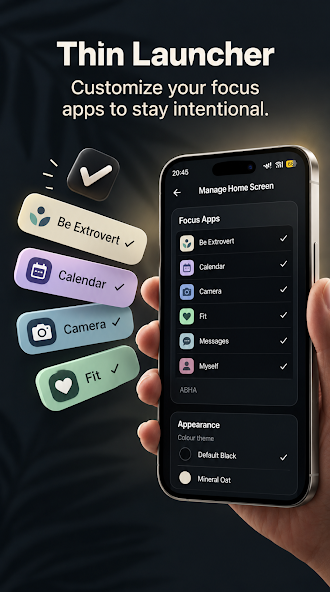
A practical way to use Thin Launcher as a student:
- Pick your academic core first. During setup, choose the apps you genuinely need for coursework before anything else — notes, calendar, email, your school's app, a calculator.
- Use the remaining slots deliberately. If you're on the free tier's 7 apps, you might have one or two slots left for messaging or maps. Don't default-fill them with whatever's most tempting.
- Lean on search for everything else. If you genuinely need an app that's not on your home screen — a one-off, like checking a delivery status — the app drawer search gets you there in a few seconds. It's not blocked, just not sitting in front of you by default.
- Revisit your set between semesters. What counts as "essential" changes with your course load. It's fine to swap an app out when your classes change.
What this won't do
To be upfront: Thin Launcher doesn't track your screen time, doesn't block any app by schedule, and doesn't stop you from searching for a distracting app and opening it anyway if you really want to. It's not an exam-lockdown tool. What it changes is the default — the thing that happens if you unlock your phone without a specific plan, mid-study-session, out of habit rather than intention. For the much more common failure mode of "I meant to check one notification and ended up on a different app for twenty minutes," removing the reflexive option does most of the work.
A note on group projects and shared deadlines
Group coursework adds a wrinkle: you often can't fully step away from a messaging app, because that's where your group is coordinating. The point isn't to remove that app — it's to make sure it's the only messaging-shaped thing competing for your attention. A student juggling a group chat for one class, a separate chat for a club, and three personal social apps all sitting on the same home screen is set up to drift from "checking the project thread" into an unrelated scroll within seconds. Keeping just the coursework-relevant chat visible, and letting the rest wait in the drawer until you have a deliberate moment for them, keeps the necessary check-ins quick and contained instead of becoming an open door to everything else.
If you want the broader reasoning behind why this works — not specific to students — see our piece on phone minimalism and a simpler home screen. And if you're curious about the specific mechanics of why feeds and notifications are so hard to disengage from once you do open them, read the psychology of doom scrolling. If you're studying while working a job or juggling a busier schedule, our piece for working professionals covers the same idea applied to a workday.
Set up a home screen that matches your course load,
not your habits.
Get Thin Launcher on Google Play